Understanding Temporal's Architecture
This guide assumes familiarity with core Temporal concepts. It's recommended to read Understanding Temporal first, along with having a basic understanding of Workflows, Activities, Workers, Task Queues, and Event History.
Temporal is a tool that abstracts away a lot of difficulty for anyone managing applications that need to be resilient to failures. This guide provides a high-level overview of how Temporal works under the hood.
Application structure recap
Before diving into the architecture, let's recap what you're responsible for as a developer.
As a developer, you are responsible for the Temporal Application code, which includes writing the Activity Definition, Workflow Definition, and the code to configure and start the Workers that coordinate with a Temporal Service to execute your Workflow and Activity code.
As part of the Temporal Platform, we also have the Temporal Service, which runs the Temporal Server with its database and optional components, and is responsible for orchestrating execution. A Temporal application gains its durability, scalability, and reliability from the support provided by the Temporal Service.
Overall architecture
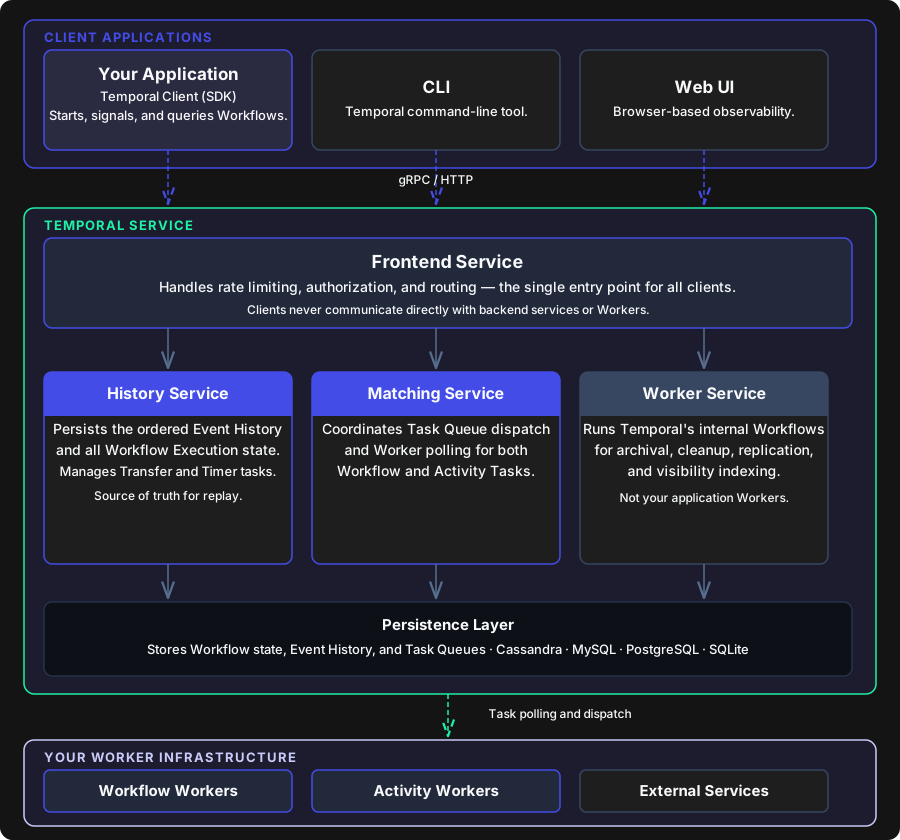
Temporal platform layers: Client Applications, Temporal Service, and your Worker Infrastructure
Client application
A Temporal Client is one aspect of your Temporal application and is provided by a Temporal SDK. It offers a set of APIs to communicate with a Temporal Service. You instantiate and use it in your own application code to start and manage Workflow Executions.
Consider the example of an order processing system. A Temporal Client lets you:
- Start a Workflow Execution, for example, when a customer places an order.
- Signal a Workflow Execution to update the order if the customer changes their shipping address.
- Query a Workflow Execution to retrieve the current status of the order.
- List Workflow Executions to view all orders being processed or that have been completed.
- Get the result of a Workflow Execution to retrieve the final outcome of the order processing.
- Manage Workflow Executions by canceling, terminating, or describing them when needed.
In the wider platform, there are three kinds of clients that talk to the Temporal Server:
- Temporal's command-line interface (CLI)
- Temporal's web-based user interface (Web UI)
- A Temporal Client embedded into the applications you run
The Temporal Server
The Temporal Server is the heart of the platform. It's responsible for orchestrating Workflow Execution, maintaining state, and ensuring reliability.
The Temporal Server consists of a frontend and multiple backend services, plus a database as a required external component. A Temporal Server may also include optional components, such as Elasticsearch for advanced search visibility or Grafana for operational dashboards and observability.
Frontend Service
From your application's perspective, the Frontend Service is the Temporal endpoint your Temporal Client talks to. Your client sends requests (start Workflow, Signal, Query, etc.) to the Frontend, and the Frontend forwards them to the appropriate backend services.
It handles rate limiting, authorization, validation, and routing requests internally to the right subsystem. Clients never communicate directly with backend services or Workers; everything goes through this unified entry point.
Temporal Service backend
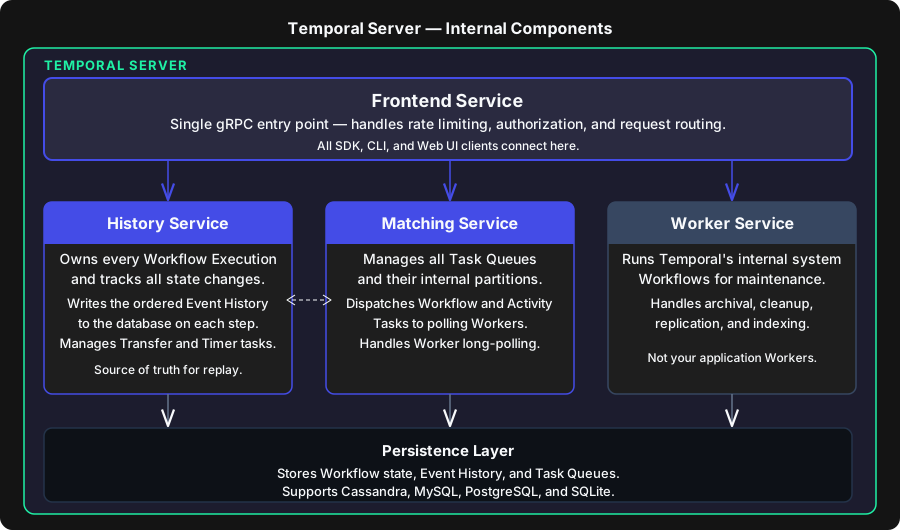
Temporal Server internal components: Frontend Service routes all traffic to History, Matching, and Worker Service, all backed by the Persistence Layer
The backend consists of several specialized services: the History Service, Matching Service, Worker Service, and a Persistence Layer.
History Service
The History Service is a central part of how Temporal provides durable execution. It keeps track of everything that happens in each Workflow by writing an ordered Event History to the database, so Temporal always knows what has happened. This includes when a Workflow started, Activities ran, Signals were received, timers fired, and when it completed or failed. Overall, the History Service persists all Workflow Execution state, including the Event History, any mutable state, and internal task queues like timers, transfers, replication, and visibility/indexing.
The Event History is the key to making your application reliable and crash-proof. When an error or failure happens in your app, Temporal will recreate the state by parsing the Event History and replaying each step. That's why determinism and idempotency are important when creating your Workflows.
Matching Service
The Matching Service manages most of the coordination between other services, especially Task Queues and Task Queue partitions. This is where Tasks are dispatched to their respective queues before being picked up by the corresponding Workers. Worker polling also takes place here, allowing the service to determine how many more Tasks should be sent to a Worker from a Task Queue.
When a Workflow Task or Activity Task needs to be executed, the Matching Service finds an appropriate Worker polling the queue and hands off the task.
Worker Service
The Worker Service handles all of the background functionality that keeps the Temporal Service running smoothly, including internal Workflows, maintenance jobs, cleanup, replication, archival, and visibility indexing. This is different from your application Workers. You won't interact with this layer directly; the Worker Service handles Temporal's own operational tasks, like archiving old Workflow histories or running scheduled maintenance.
Persistence Layer
You can configure the database used to store Workflow state, Event History, and Task Queues. Supported options include Cassandra, MySQL, PostgreSQL, and SQLite. This is also where metadata about your Workflows and other data needed for durable execution is stored. This persistence enables recovery and replay: if anything fails, Temporal can reconstruct the exact state of a Workflow from its Event History.
External services
External services are anything outside of your own application code and outside Temporal itself, such as third-party APIs, databases that store customer data, or messaging systems.
Temporal can also integrate with Elasticsearch to provide advanced search and visibility capabilities for Workflow Executions. Without it, you're limited to basic filtering. Grafana can be used to enable operational dashboards and monitoring for the Temporal Service itself.
Infrastructure (Worker processes)
This is where the code for your Workers, Workflows, Activities, Signals, Updates, and Queries gets executed on your own infrastructure. This is also where you scale up the number of Workers to increase how many Workflows can run simultaneously.
Your Workflow code is the orchestration layer that defines the structure of your application. It needs to be deterministic so Temporal can help your app survive process crashes, outages, and other failures.
Your Activities are where the actual work happens: invoking tools, making API requests, calling third-party services. These can be as unpredictable and non-deterministic as needed.
That's what makes Temporal so valuable for long-running Workflows. When your Workflow involves multiple steps (calling an endpoint, waiting on customer input, triggering an event based on that input, calling a third-party service, updating the database, sending info to the customer, sending info to an internal user, calling a different endpoint), any of those steps could fail. Durable execution means that Temporal will recreate the chain of events leading up to the failure and resume forward from that point.
End-to-end lifecycle of a Workflow and Activity
The following sections walk through the complete lifecycle of a Workflow Execution, from the initial client call through Activity completion and final result retrieval.
Next steps
- Developer Guides: Step-by-step guides for writing Workflows, Activities, and configuring Workers
- Temporal Courses: Structured, in-depth learning paths covering core concepts and best practices